TalkingPhotos.ai is an AI-powered platform designed to transform static images into animated videos where characters can talk, sing, or perform actions. The tool targets content creators, marketers, educators, and social media users who want to produce engaging video content without complex video editing skills.
This review examines the platform’s features, strengths, limitations, pricing model, and overall usefulness.
Overview of the Platform
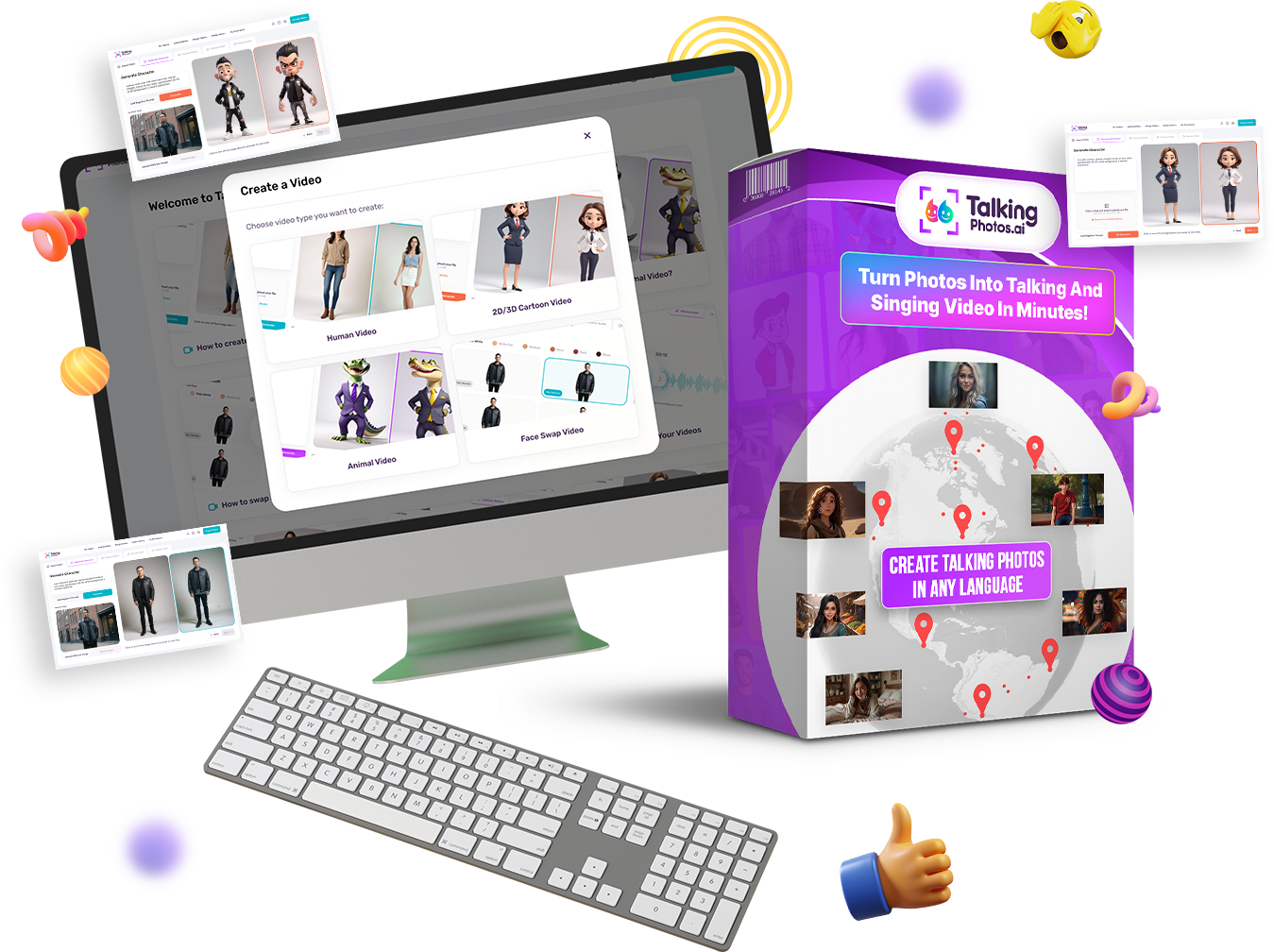
TalkingPhotos.ai focuses on converting still images into animated “talking photo” videos. Users can upload an image or generate a character with AI, then add audio or text-to-speech so the character appears to speak with synchronized lip movements and facial expressions.
The platform aims to simplify video production by allowing creators to generate animated spokesperson-style videos without filming actors or recording traditional footage.
Typical uses include:
-
Social media videos
-
Marketing content
-
Educational storytelling
-
YouTube videos
-
AI spokesperson videos
The platform also supports multiple character types, including humans, cartoons, animals, and fantasy characters.
Key Features
1. Photo-to-Talking Video Conversion
The core functionality allows users to turn a static photo into a speaking character with lip-sync and facial expressions. Users can add their own audio, record directly, or use text-to-speech voices.
2. AI Character Creation
Users can generate characters using prompts, including human avatars, cartoon characters, and animals. This allows creators to build unique video personalities without needing graphic design skills.
3. Motion and Action Library
The platform includes more than 40 character actions such as walking, waving, dancing, and gesturing, which can make the generated videos appear more dynamic.
4. Voice and Speech Options
TalkingPhotos.ai supports both uploaded voiceovers and built-in text-to-speech voices in multiple languages. This feature allows users to produce multilingual videos without recording new audio.
5. Face Swap and Avatar Tools
The software includes face-swap capabilities so users can insert their own face or a client’s face into AI-generated characters for personalized videos.
6. Storyboard and Editing Tools
A storyboard feature lets users combine multiple scenes into longer videos, enabling simple storytelling or presentation-style content creation.
7. Full HD Video Output
Generated videos can be downloaded in Full HD format and shared on platforms like YouTube or social media.
Pricing Model
One aspect highlighted by the platform is its one-time payment pricing structure rather than recurring subscriptions.
-
Basic plan: lower-cost entry with shorter video limits
-
All-access plan: approximately $97 for access to all features and longer videos
The company states that there are no monthly fees, though daily generation limits may apply to prevent excessive usage.
A 30-day money-back guarantee is also offered.
Potential Advantages
1. Beginner-Friendly
The interface is designed to simplify AI video creation, making it accessible to users without video editing experience.
2. Versatile Content Creation
The ability to animate human, cartoon, and animal characters opens possibilities for marketing, education, and entertainment.
3. Cost Structure
A one-time payment model can be appealing compared with AI tools that charge monthly subscription fees.
4. Automation
Features such as automatic lip-sync and facial expressions reduce the need for manual animation.
Potential Limitations
1. Video Length Limits
Some plans restrict how long each generated video can be, which may limit certain types of content.
2. Realism Variability
AI-generated motion and lip synchronization can vary in realism depending on the image and audio used.
3. Feature Expectations
Some user feedback suggests the platform could expand presets or improve certain animation controls.
4. AI Ethics and Copyright
Users must ensure they do not use copyrighted images or celebrity likenesses without permission, particularly for commercial content.
User Feedback
Available reviews online show mixed reactions.
Some users highlight ease of use and the ability to create engaging AI spokesperson videos quickly.
However, other reviewers express skepticism about the website design or reliability, suggesting potential buyers should research further before purchasing.
As with many AI tools, experiences may vary depending on expectations and specific use cases.
Who This Tool Is Best For
TalkingPhotos.ai may be suitable for:
-
Content creators producing social media videos
-
Marketers creating AI spokesperson content
-
Educators making animated storytelling videos
-
YouTubers who want talking avatars instead of appearing on camera
It may be less suitable for high-end cinematic animation or complex character control.
Final Verdict
TalkingPhotos.ai represents a growing category of AI tools designed to automate video creation by animating static images. Its combination of talking avatars, text-to-speech, and animation presets can help creators produce engaging content quickly.
While the one-time pricing and broad feature set are attractive, potential users should carefully evaluate video quality, generation limits, and user reviews before committing.
Overall, the platform appears to be a practical option for simple AI spokesperson videos and social media content, especially for users seeking an accessible entry into AI-generated video production.